Edit Certificate/License Types
When applicants are filling out the certification/licensure page, they are presented with a list of state defined certificates to pick from. The list on that page is controlled from Setup. Changing the list in Setup will change what applicants can pick from. Therefore, you can add, remove and rename certificates as necessary.
Here's how:
1) Click on Setup
2) Click Edit Certificate Types. If your state refers to these as Licenses, then your link will be listed as Edit License Types.
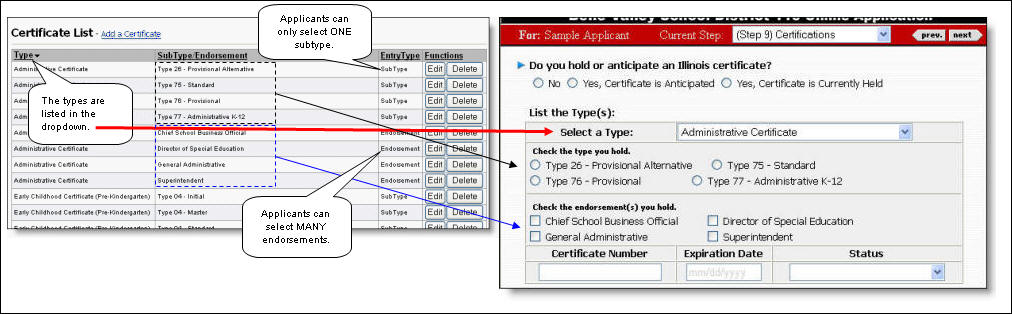
3) If you need to Add a certificate type to the list, then click the link, "Add a Certificate." Otherwise, find the record you want to Edit or Delete and then click the appropriate button. Please review the following illustration for clarification on how the SubTypes and Endorsements are reflected to the applicant.
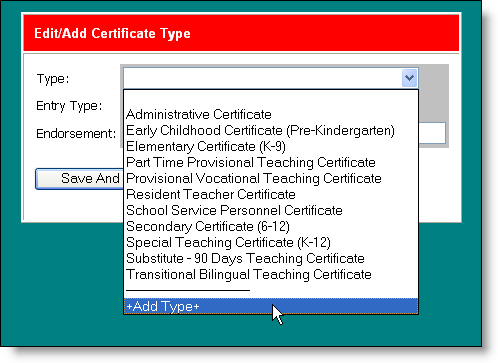
4) When editing or adding a certificate, you will see the following form. If the "Type" of certificate is not listed, you can add a new type/category of certificate by dropping down the Type drop-down and selecting "+Add Type+". This will present a dialog where you type in the title of the new type of certificate.